



How to Choose the Right Industrial Touchscreen?
Choosing the right Industrial Touchscreen is rarely a simple matter of selecting the largest display or the lowest price. In a factory, the screen may face dust, oil mist, vibration, gloves, and sudden temperature changes. A model that performs well in an office can fail beside a cutting machine. That difference matters.
Begin with the working environment. Check the required IP rating, operating temperature, brightness, and viewing angle. A food-processing line may need a sealed front surface for frequent cleaning. A warehouse terminal may require strong backlighting for sunlight near loading doors. Capacitive touch technology feels smooth, but thick gloves or moisture can reduce accuracy. Resistive touch may respond better in those conditions, although it can feel less modern.
The best decision also depends on integration. Confirm the operating system, mounting method, screen size, communication ports, and expected service life. Industrial users should request test reports, warranty terms, and evidence of long-term component availability. Standards and supplier documentation provide useful guidance, but real testing remains essential. Ask the vendor to demonstrate the panel with your gloves, software, cables, and cleaning process. Small details often expose major weaknesses.
There is no universal winner. Sometimes, I have seen teams overvalue resolution while overlooking connector protection. That mistake becomes expensive later. A reliable Industrial Touchscreen should support safe operation, clear visibility, stable communication, and practical maintenance. Choose for the actual workspace, not for a product photograph. Even experienced buyers should leave room for doubt, because field conditions are often less predictable than specifications suggest.
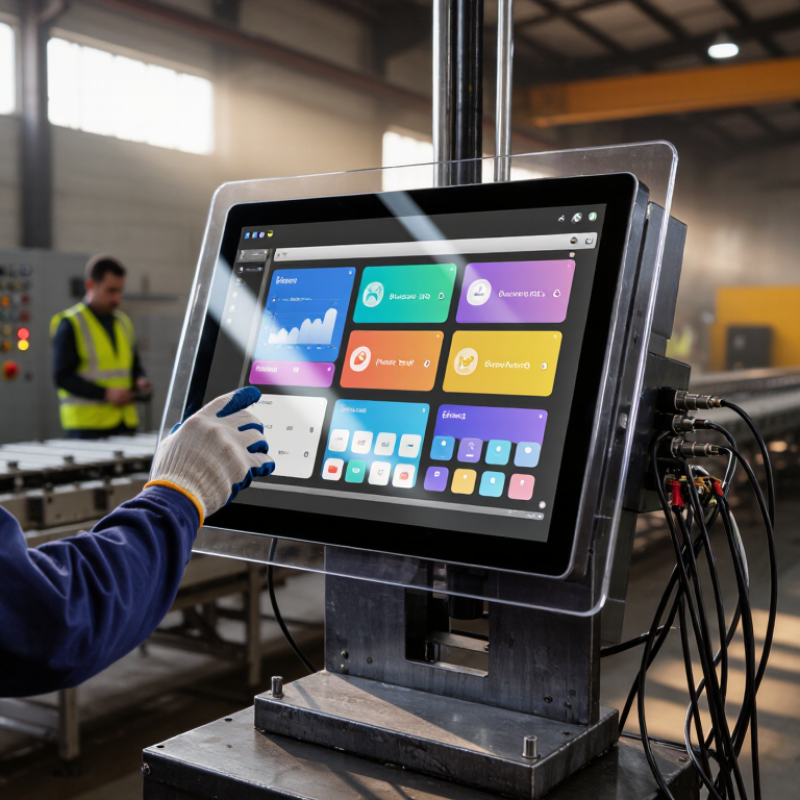
Define the Industrial Environment and Operating Conditions
How to Choose the Right Industrial Touchscreen?
Choosing an industrial touchscreen begins with the environment, not the screen size. Map temperature, humidity, dust, water, vibration, and lighting around the installation point. A production line may experience heat from ovens, sudden cooling during washdowns, and constant mechanical movement. Near cutting equipment, airborne particles can settle around connectors and ventilation openings. Record the highest and lowest conditions, including seasonal changes. Small details matter.
Operating conditions also determine the touchscreen’s practical design. Workers may use gloves, wet fingers, or tools while wearing protective equipment. Test touch accuracy with the actual gloves used on site. Strong sunlight can reduce readability, while dim areas require controlled brightness without causing glare. Cleaning chemicals may damage unsuitable surfaces. An enclosure rating should match the expected exposure, and cable protection must suit vibration and repeated movement. Do not rely on a dry laboratory test alone.
Define required uptime, response speed, mounting space, and service access before selecting hardware. Check whether operators need alarms, large controls, or readable data from several meters away. Field testing should include temperature changes, vibration, moisture, and repeated touches. A paper specification can still disappoint. That assumption is convenient, but incomplete. It is also wise to question early estimates, because real operators often work faster and less carefully than planned. Leave room for maintenance, gloves, fingerprints, and imperfect cleaning routines.

Match Screen Size, Resolution, and Viewing Distance
How to Choose the Right Industrial Touchscreen?
Match Screen Size, Resolution, and Viewing Distance
Choosing an industrial touchscreen begins with the operator’s real viewing distance. A 7-inch display may suit a nearby control panel, while a larger screen improves readability across a production area. Measure where users stand, not where the screen looks attractive in a catalog. A large display can still feel cramped when it shows dense menus.
Resolution must support the information being displayed. High resolution creates sharper text, but it does not automatically improve usability. Small labels may remain difficult to read from two meters away. Check pixel density, font size, and contrast together. In practical installations, operators often prefer clear, well-spaced controls over decorative detail. This is not a perfect rule. Lighting, dust, gloves, and viewing angles can change the result.
Tips: Test a full-size screen mock-up at the actual distance. Display the smallest important label. If users lean forward, increase text size or screen size. If the interface feels empty, reduce clutter before lowering resolution. Leave room for future data, but avoid paying for pixels operators cannot use. A short trial often reveals more than a specification sheet.
Choose the Appropriate Touch Technology and Interface
Choosing the right industrial touchscreen starts with the touch technology, not the display size. A factory operator may use gloves, wet hands, or a metal stylus. These conditions can quickly expose a poor match. Resistive touch technology responds to pressure and works reliably with gloves. It also suits dusty areas because accidental surface contact is less likely. Projected capacitive touch feels faster and supports gestures, but moisture and thick gloves can reduce accuracy. Test the actual glove, liquid, and cleaning process before approving a design.
The interface must fit the whole control system. USB is convenient for short connections and standard peripherals. Serial interfaces remain useful for simple, stable machine communication. Ethernet supports longer distances and networked equipment, but it needs careful protection from electrical noise. Check connector placement, cable locking, protocol compatibility, and recovery behavior after power loss. Small details matter. A loose cable can stop a production line.
Reliable selection requires evidence from real operating conditions. Review operating temperature, ingress protection, surface hardness, response time, and expected touch cycles. Ask for clear test methods, not only attractive specifications. A laboratory test may not represent oil mist, vibration, or repeated cleaning. I once underestimated the effect of thick work gloves; the screen passed a desk test but failed during a night shift. That mistake changed the evaluation process. Let operators test the interface for several hours, then record missed touches, glare, fatigue, and input errors. Specs help, but field feedback decides.
Evaluate Durability, Compatibility, and Installation Requirements
How to Choose the Right Industrial Touchscreen?
In industrial settings, durability is more than a strong glass surface. Check the IP rating for dust and water exposure, then examine the IK rating for impact resistance. A touchscreen near cutting equipment may face vibration, oil mist, and accidental tool contact. Choose a wide operating temperature range if the panel will sit near furnaces or cold storage areas. Glove operation matters too. Test it with the actual gloves used by operators, not clean bare fingers.
Compatibility can prevent expensive redesigns. Confirm the screen size, aspect ratio, brightness, viewing angle, and native resolution before ordering. Review communication protocols, operating systems, voltage requirements, and connector locations with the control engineer. A display may appear suitable but fail because its software driver does not support an older controller. That happened during one commissioning project. We checked the image quality first and overlooked the interface converter.
Installation requirements deserve equal attention. Measure the panel cutout, cabinet depth, cable bend radius, and mounting clearance on site. Leave room for ventilation and service access. Front mounting may simplify cleaning, while rear mounting can protect cables better. Avoid forcing a tight fit. It can distort the frame and reduce touch accuracy. I also recommend a short trial installation, although production teams often skip it under schedule pressure. That shortcut can create alignment, grounding, or maintenance problems later.
Compare Certification, Maintenance, and Total Ownership Costs
Choosing the right industrial touchscreen requires more than comparing screen size and brightness. Certification, maintenance, and total ownership costs deserve equal attention.
During factory evaluations, I check whether certifications match the installation environment. A touchscreen near washdown areas needs suitable ingress protection, not just a general safety certificate. Electrical, electromagnetic compatibility, and material certifications should be current and traceable. Ask for test reports, certificate numbers, and operating limits. Paperwork alone is not protection. I once assumed a certificate covered the complete system, but it applied only to a component.
Maintenance costs can quietly exceed the purchase price. Examine the panel’s resistance to gloves, dust, cleaning chemicals, and repeated contact. A sealed enclosure may reduce contamination, but it can increase heat buildup and complicate servicing. Ask how quickly the display, cables, and mounting parts can be replaced. Remote diagnostics may reduce technician visits. Keep critical spare parts nearby. Downtime is expensive.
For total ownership cost, calculate installation, training, energy use, cleaning supplies, repairs, calibration, and disposal. Compare these expenses across five years, not only the quoted price. A cheaper touchscreen may require more frequent replacement or specialized service. Include warranty limits and expected maintenance intervals in the spreadsheet. My estimates are never perfect; real usage often exposes missed costs. Review the figures with operators and maintenance staff who face the equipment every day.
How to Choose the Right Industrial Touchscreen? - Compare Certification, Maintenance, and Total Ownership Costs
| Evaluation Dimension | General-Purpose Industrial Panel | Rugged Washdown Panel | High-Brightness Outdoor Panel | Hazardous-Area Certified Panel |
|---|---|---|---|---|
| Typical screen size | 10.1–15.6 in. | 12.1–21.5 in. | 10.1–21.5 in. | 10.1–15.6 in. |
| Recommended environment | Indoor factory floors, machine control, warehouses | Food processing, chemical handling, frequent cleaning | Outdoor kiosks, loading areas, semi-covered production zones | Potentially explosive atmospheres requiring certified equipment |
| Indicative purchase price per unit | US$900–1,600 | US$1,500–3,000 | US$1,800–3,500 | US$3,500–8,000 |
| Common regulatory markings | CE or UKCA where applicable; FCC requirements may apply in the United States | CE or UKCA; FCC requirements may apply; food-contact suitability must be assessed separately | CE or UKCA; FCC requirements may apply; local electrical approvals may be required | Applicable hazardous-location certification, such as ATEX, IECEx, or North American approval |
| Ingress protection target | Typically IP65 on the front; enclosure rating varies | Typically IP65–IP69K when the complete enclosure is certified | Typically IP65 on the front; verify rear and cable-entry protection | Certification-specific; do not infer hazardous-area approval from an IP rating alone |
| Operating temperature range | Approximately 0°C to 50°C | Approximately −20°C to 60°C | Approximately −20°C to 65°C; sunlight-management options may be needed | Typically −20°C to 55°C; certification limits must be checked |
| Touch technology | Projected capacitive or resistive; glove compatibility varies | Projected capacitive or resistive; wet-touch performance should be tested | Projected capacitive with high-brightness display; optical bonding is beneficial | Often resistive or specially engineered capacitive touch; certification constraints apply |
| Brightness | Approximately 300–500 cd/m² | Approximately 400–700 cd/m² | Approximately 800–1,500 cd/m² | Approximately 400–800 cd/m², subject to certified construction |
| Cleaning and maintenance profile | Routine wiping; avoid unapproved solvents and excessive moisture | Designed for more frequent cleaning; inspect seals, connectors, and mounting hardware | Clean display and light sensor; inspect sunshield, cooling path, and cable glands | Follow documented cleaning procedures; unauthorized modifications can invalidate certification |
| Estimated annual maintenance cost | US$100–180 | US$180–350 | US$220–450 | US$300–650 |
| Typical replacement cycle | 5–7 years under moderate indoor use | 6–8 years with proper sealing and cleaning practices | 5–7 years; backlight aging may be accelerated by heat and high brightness | 7–10 years where certified spare parts remain available |
| Estimated installation and commissioning cost | US$250–600 | US$350–800 | US$450–1,000 | US$800–2,000, including site and compliance checks |
| Estimated five-year downtime and service allowance | US$300–800 | US$250–700 | US$500–1,200 | US$600–1,500 |
| Estimated five-year total ownership cost | US$1,950–3,900 | US$3,000–5,950 | US$4,050–7,950 | US$6,400–12,750 |
| Best value when | The environment is controlled and the lowest initial cost is important | Frequent washdown or contamination would otherwise cause premature failures | Readability, sunlight resistance, and reduced operator error are priorities | The installation is located in a regulated hazardous area where compliance is mandatory |
Article Source:

Whether your solution requires a single pumping application or an expansive engineered system,
CheckPoint is committed to becoming your partner in excellence.


